

A tracking scan shows where a parcel is in its journey, but it does not always confirm who received it. To track a package, enter its tracking number in the carrier’s tracking tool and review the latest status and scan details. Proof of delivery tracking helps you find the delivery confirmation and see what evidence is available, such as an electronic signature, delivery photo, or timestamp.
When a status has not changed, or says “delivered” but the parcel is not where you expected, the details matter. A status update reports progress; proof of delivery records evidence of delivery. Knowing the difference helps you decide what to do next.
This guide explains how to find your tracking number, read common parcel statuses, and locate electronic proof of delivery. You will also learn what the evidence can show and where its limits are, so you can follow an urgent business shipment more clearly.
Key Takeaways
- Use the tracking number in the carrier’s tracking tool to follow a parcel’s progress and see its latest scan.
- Learn how to distinguish a shipment status from delivery evidence, including a signature, photo or timestamp.
- Find out where to locate a tracking number and how to read common status updates.
- Understand what electronic delivery confirmation can document and what details to review when a delivery is disputed.
- See when Sameday Express’s same-day delivery, rush delivery or direct-drive options may suit a time-critical business shipment.
Digital signatures, photos, geotags, and timestamps
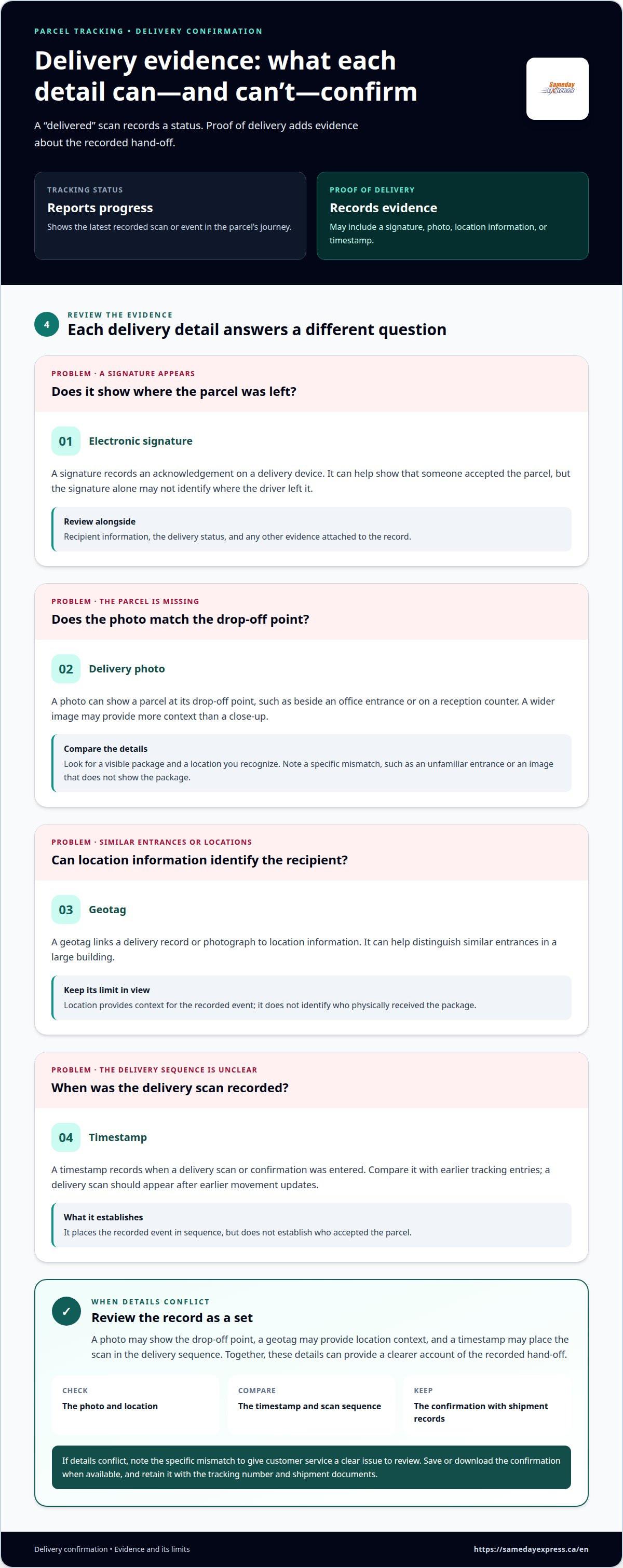
A delivery record can combine an electronic signature, photograph, location data, and timestamp. Each item captures a different detail about a package’s arrival, so reviewing them together can provide a clearer account of the recorded hand-off.
Digital Signatures and Delivery Photos
An electronic signature records an acknowledgement on a delivery device. It can help show that someone accepted the package, but the signature alone may not identify where the driver left it. Review the recipient information alongside the delivery status and any other evidence attached to the record.
A delivery photo can show a parcel at its drop-off point, such as beside an office entrance or on a reception counter. Look for a visible package and enough surrounding detail to recognize the location. A close-up may show the parcel, while a wider image provides more context.
If a record says “delivered” but the parcel is missing, compare the image with the stated drop-off location. Note a specific mismatch, such as an unfamiliar entrance or a photo that does not show the package. This gives customer service a clear issue to review.
Geotags and Delivery Timestamps
A geotag links a delivery record or photograph to location information. It can help distinguish similar entrances in a large building, but it does not identify who physically received the package. Treat the location as context for the recorded event, not proof of the recipient’s identity.
A timestamp records when a delivery scan or confirmation was entered. Compare it with the event sequence in the tracking history. For example, a delivery scan should appear after earlier movement updates. The timestamp places the recorded event in sequence, but does not establish who accepted the parcel.
How long Canadian carriers keep proof of delivery records depends on their recordkeeping processes. Save or download the confirmation when available, and retain it with the tracking number and shipment documents.
Review the evidence as a set. A photo may show the drop-off point, a geotag may provide location context, and a timestamp may place the scan in the delivery sequence. If details conflict, note what differs, such as a location that does not match the intended address. This gives you a specific basis for follow-up, rather than relying only on a “delivered” status.
Finding a tracking number
Start with the shipment confirmation, receipt, or dispatch notice. The sender or seller usually provides the tracking number when the package is prepared for shipment. Search your email for the carrier’s name, “shipment,” or “tracking,” and check the order details if the notice is missing. For a business shipment, review the dispatch record or shipping label.
Enter the number in the carrier’s tracking tool exactly as shown, including its letters and digits. Avoid adding spaces or punctuation unless the form requires them. A manual entry error can return no result or show another shipment. If the number appears invalid, compare it character by character with the original notice before trying again.
Tracking number formats vary by carrier and shipment type. An Air Waybill number has eleven digits and can be used to check a shipment’s status and current position. A sea-freight container number is a different identifier; shipping container numbers usually have a four-digit prefix. Use the identifier requested by the tracking tool.
- Parcel: Use the tracking number in the shipment notice or on the shipping label.
- Air shipment: Enter the eleven-digit Air Waybill number in the relevant tracking tool.
- Sea freight: Use the container number when the tracking system asks for it.
A single shipment may have linked tracking numbers when it moves between systems or shipment stages. For example, an order reference may connect to a carrier’s parcel number, while a separate identifier follows a larger freight movement—a common scenario during overseas and corporate moves coordinated by relocation specialists like asiaticrelo.com. Use the number that matches the carrier or stage you want to track. If a shipment notice lists several identifiers, keep them together with the order reference.
Some tracking platforms combine linked numbers into one shipment timeline. This can make hand-offs and separate movement records easier to follow, but each number may still lead to a different tracking view. Match each status to the identifier shown beside it. Turn on available notifications for important shipment updates, and retain the original notice in case the tracking page changes.
For a time-critical shipment, organized identifiers help teams act quickly when a status needs attention; our time-critical shipment options support urgent delivery coordination.
Understanding parcel tracking statuses
A tracking status records a scan or event in a parcel’s journey. Read the latest update alongside earlier entries to understand what has happened and what step comes next.
Checking Delivery Status
Enter the tracking number in the carrier’s tracking tool, then review the latest status and its date. Compare it with earlier scans to see whether the parcel is moving, awaiting a scan, or marked delivered. For example, “out for delivery” indicates a delivery-stage update, while “delivered” records completion in the tracking system.
Tracking systems may use GPS or RFID technology to provide real-time location updates. A status can still reflect the latest recorded event rather than the parcel’s exact current position. If “in transit” appears across several updates, compare scan locations and times before treating the parcel as delayed.
Email Alerts for Status Changes
Email alerts can notify you when a parcel reaches key stages, such as dispatch, an attempted delivery, or a delivered scan. Use the shipment notice’s notification settings to select available updates and enter the email address that should receive them. For business shipments, a shared inbox can keep the relevant team informed.
Read each notification’s status and timestamp, then open the tracking record when the details matter. An email saying “delivered” is a status alert; the tracking page may provide further delivery information. If an expected update does not appear, check the tracking tool directly rather than relying on email alone.
Some status labels describe a process, not a problem. “Electronic data received” means shipment information has been submitted, but it doesn’t confirm that the parcel has entered physical transit. The tracking guidance for this status advises waiting one or two weeks before checking again. If no new status appears, check the tracking record and review the shipment notice.
“Departure from outward office of exchange” marks an international postal stage. If that status remains for more than 2 or 3 weeks, the parcel may have trouble passing security checks and may be returned to the shipper. Review the latest scan and contact the shipper if the timeline raises concerns about the order.
Use a simple sequence to assess an update:
- Read the exact status label and timestamp.
- Compare the latest scan with the previous location or event.
- Check for a later delivery attempt, exception, or confirmation.
Delivery tracking systems can use GPS and RFID for real-time updates, while email alerts flag selected changes. Neither replaces a review of the full scan history. For example, “delivered” differs from “out for delivery”: the first records a completed delivery scan, while the second signals a delivery-stage update. If a parcel is marked delivered but has not arrived, look for the recorded delivery confirmation and follow the carrier’s process for reporting the discrepancy.
Electronic proof of delivery and delivery confirmation
Electronic proof of delivery turns a completed delivery into a record that can be reviewed later. For a Canadian business, it can support customer service, internal accountability, and an audit trail. It may also help resolve a dispute by showing what the carrier recorded at delivery. Its usefulness depends on clear, timely information linked to the correct shipment.
After a parcel is marked delivered, open its tracking record and locate the delivery confirmation. Review the shipment identifier, delivery status, and available evidence together. A record connected to the wrong order can create confusion, even when the scan is accurate. Match the tracking details with the order or dispatch record before filing the confirmation.
Electronic evidence can include a recipient’s signature, delivery photograph, or timestamped confirmation. Each item answers a different question. A signature records an acknowledgement, a photograph can show the drop-off context, and a timestamp places the recorded event in sequence. When the details agree, they provide a clearer account than a delivered status alone.
For an efficient review, organize the record around these checks:
- Shipment match: Confirm the tracking identifier belongs to the order or dispatch.
- Event details: Read the delivered status and its recorded time.
- Supporting evidence: Review any signature or image attached to the confirmation.
- Recordkeeping: Save the confirmation with the related shipment documentation.
When a customer reports a missing parcel, compare the delivery record with the report. A confirmation may show a delivery event, but the recipient may still dispute the location or receipt. Note the specific mismatch, such as a delivery image showing a different entrance. Clear details help customer service understand the issue and direct the follow-up.
For business teams, consistent records also support auditing and accountability. A dispatch record, tracking history, and electronic confirmation can form a useful sequence for reviewing a shipment. Keep each item associated with the same order reference. If an update is delayed or inconsistent, use the tracking record as your reference point and avoid treating an email alert as the full delivery file.
Proof of delivery tracking is most useful when the confirmation is timely and linked to the correct shipment. Inconsistent updates can frustrate customers and slow dispute reviews. Check that the final status, supporting evidence, and shipment reference tell a consistent story. If they do not, note the discrepancy and relevant tracking details before following up.
Definition of delivery tracking and proof of delivery
Delivery tracking follows a shipment through its journey; proof of delivery records evidence that it was received as intended. The two records answer different questions. A tracking timeline shows movement and status changes, while a delivery record supports the final hand-off. For a Canadian business, separating these functions makes shipment updates easier to interpret.
Consider a package moving from a warehouse to a customer. Tracking may show that it was picked up, moved through a delivery network, and marked delivered. Those events describe progress. Proof of delivery adds evidence about the completed hand-off, such as a recipient acknowledgement or other delivery confirmation. A “delivered” scan is a status, not automatically the full evidence record.
This distinction matters in logistics because a shipment can have several recorded events before arrival. If a customer reports that an order was not received, the tracking history helps establish the sequence. The proof of delivery record helps examine the final event. Neither should be read alone when the shipment reference, delivery location, or recipient details differ.
Use each record for its intended purpose:
- Tracking: Follow the shipment’s progress and review recorded events.
- Proof of delivery: Review evidence associated with the recorded hand-off.
- Order record: Match the shipment to the business transaction or dispatch.
For example, an online retailer can use tracking to see that an order reached the delivery stage. If the customer says the parcel is missing, staff can review the delivery evidence and compare it with the order record. A hospital receiving a shipment can use the same distinction: movement updates indicate progress, while the final confirmation documents the recorded receipt.
These records also serve different operational needs. Tracking helps teams monitor open shipments and identify where an update stopped. Proof of delivery supports follow-up after a completed delivery, including customer questions and internal reviews. Keeping the order reference with both records helps staff connect the shipment journey to the correct transaction.
Electronic systems bring tracking events and delivery evidence into digital records, but the information is useful only when it refers to the right shipment. A mismatched reference can lead staff to review another order’s timeline. Start with the shipment identifier, then read the status history and delivery record as separate parts of the same journey.
Understanding the difference helps set clear expectations with customers. A tracking update reports what the system recorded during transit; proof of delivery provides evidence related to receipt. If your business needs to move a time-sensitive package, coordinate a delivery with a clear destination and shipment reference.
Sameday Express: same day delivery
Sameday Express provides Same Day Delivery for businesses moving urgent shipments. Choose this service when a parcel needs to reach its destination on the day it is collected, rather than following a standard delivery schedule. For a time-critical shipment, Rush delivery may suit an urgent deadline. Direct-drive delivery is an option when a shipment needs a direct route between pickup and destination.
Share the pickup and delivery locations, shipment details, and required timing when arranging delivery. These details help determine which service fits the shipment’s route and urgency. Tracking records can then help your team follow its progress and review the delivery confirmation.
Contact Sameday Express to discuss the right delivery option for your shipment.
Make your next shipment easier to manage
Set a clear delivery plan before your next shipment leaves. Assign one person to monitor its progress, keep the shipment reference with the order, and decide how your team will handle a delivery exception. This simple workflow helps staff respond consistently when timing or receipt becomes a concern.
For urgent business deliveries, Sameday Express offers Same Day Delivery, Direct-drive delivery, and Rush delivery. Choose the service that fits your shipment’s urgency and route, then keep delivery records with the related business documentation. A clear process gives your team a practical starting point for each hand-off.
Use proof of delivery tracking as part of that process, not as a substitute for clear shipment coordination. When a time-sensitive delivery needs support, contact Sameday Express Inc. for delivery support. A focused plan can help your next shipment move forward with confidence.
Frequently Asked Questions
How do I track a package?
Use the tracking number in the shipment confirmation or order details. If you are the recipient and cannot find it, check the seller’s order page or search your email for the shipping notice. For example, an online order confirmation may show the carrier and a tracking link separately. Open the carrier’s record to review the latest scan and delivery outcome.
What is proof of delivery (POD) in shipping and how does it work?
Proof of delivery, or POD, is a record associated with a shipment’s completed hand-off. A carrier may create it electronically or on paper, depending on the delivery service. For a business, the POD can be filed with an invoice or order record to document receipt. If a shipment involves several recipients, match each confirmation to its corresponding order.
How can I track a package using its proof of delivery in Canada?
A proof of delivery record is usually evidence of completion, not a tool for tracking a parcel in transit. Use the tracking number or reference shown in the shipment notice to open the carrier’s tracking record. If you already have a POD, use its shipment reference to locate the related tracking history. A delivery receipt without a usable reference may not open a tracking timeline.
What information appears on a proof of delivery receipt?
A POD receipt may show a shipment reference, delivery status, recorded delivery time, recipient acknowledgement, or delivery image. The exact fields depend on the carrier’s record format. For example, a business receiving several orders should match the reference on each receipt to its purchase order before filing it. This helps prevent a valid confirmation from being attached to the wrong transaction.
Does proof of delivery include a recipient signature or delivery photo in Canada?
It can include a signature, photo, or other delivery confirmation, but the evidence varies by carrier and service. Sameday Express’s Same Day Delivery includes signature confirmation and proof of delivery with a photo. For a specific parcel, review the record attached to its tracking history. A signature and photo provide different context, so one should not be treated as a substitute for the other.
What should I do if tracking says delivered but I did not receive the package?
First, check the delivery location shown in the record and look around the usual drop-off point, such as a building entrance or reception desk. Ask household members or workplace staff whether they accepted the parcel. If it is still missing, contact the seller or carrier with the tracking number and delivery time. Explain what you checked and report any mismatch in the record.
Can I use proof of delivery to resolve a shipping dispute or file an insurance claim in Canada?
Yes, a POD can support a dispute review or claim by documenting the carrier’s recorded delivery event. Keep it with the order confirmation, invoice, tracking history, and relevant messages. For example, if the receipt names an unfamiliar recipient, include that detail when submitting your concern. Follow the process set by the seller, carrier, or insurer, and provide the records they request.
Disclaimer
Blog Disclaimer
The information published on the Sameday Express Blog is provided for general informational and educational purposes only. While we strive to keep all content accurate and up to date, Sameday Express makes no representations or warranties of any kind, express or implied, regarding the completeness, accuracy, reliability, suitability, or availability of the information contained in our articles.
The content on this blog does not constitute legal, customs, tax, regulatory, financial, or professional advice. Shipping regulations, carrier policies, customs requirements, and transportation laws may change without notice and may vary by destination. Readers should verify current requirements with the appropriate government authorities, carriers, or qualified professionals before making shipping or business decisions.
Sameday Express is not liable for any loss, damage, delays, or consequences arising from the use of, or reliance on, information published on this website. Any actions taken based on the information provided are at the reader's own risk.
References to third-party companies, products, services, or websites are provided for informational purposes only and do not constitute an endorsement or recommendation by Sameday Express.
All blog content, including text, graphics, images, and logos, is the property of Sameday Express unless otherwise stated and may not be reproduced or distributed without prior written permission.
For specific shipping requirements, pricing, transit times, or logistics solutions, please contact Sameday Express directly for personalized assistance.


