

Shipping control depends on visibility, not just the software you choose. Getting control of your company’s shipping starts with a clear view of every shipment, from dispatch to delivery, and a process for responding when plans change. Tracking is useful only when staff can see meaningful updates and know what action to take.
When you manage orders across carriers, shipment details can become scattered across systems. That makes delays harder to spot and routine updates more difficult to manage. Switching providers can add friction too: according to the Competition Bureau Canada, it can involve manual data transfers and service disruptions.
This guide explains how to bring shipment records together, set up useful tracking and automate shipping tasks while keeping operational challenges in view. You’ll learn how to connect shipment data with business processes, manage exceptions and use delivery history to plan more effectively. The result is a practical way to improve visibility and manage small-business logistics with greater confidence.
Key Takeaways
- Give each shipment a unique tracking ID so its progress can be followed across carrier and internal systems.
- Set alerts for delays, customs holds and delivery exceptions, then define who responds to each alert.
- Connect shipping software with your ERP to keep order, inventory and delivery information aligned and reduce manual updates.
- Use shipment history, inbound freight data and delivery performance to spot recurring issues and improve planning.
- Plan provider changes carefully: manual data transfers and service disruption can create operational barriers.
Shipment traceability and real-time monitoring
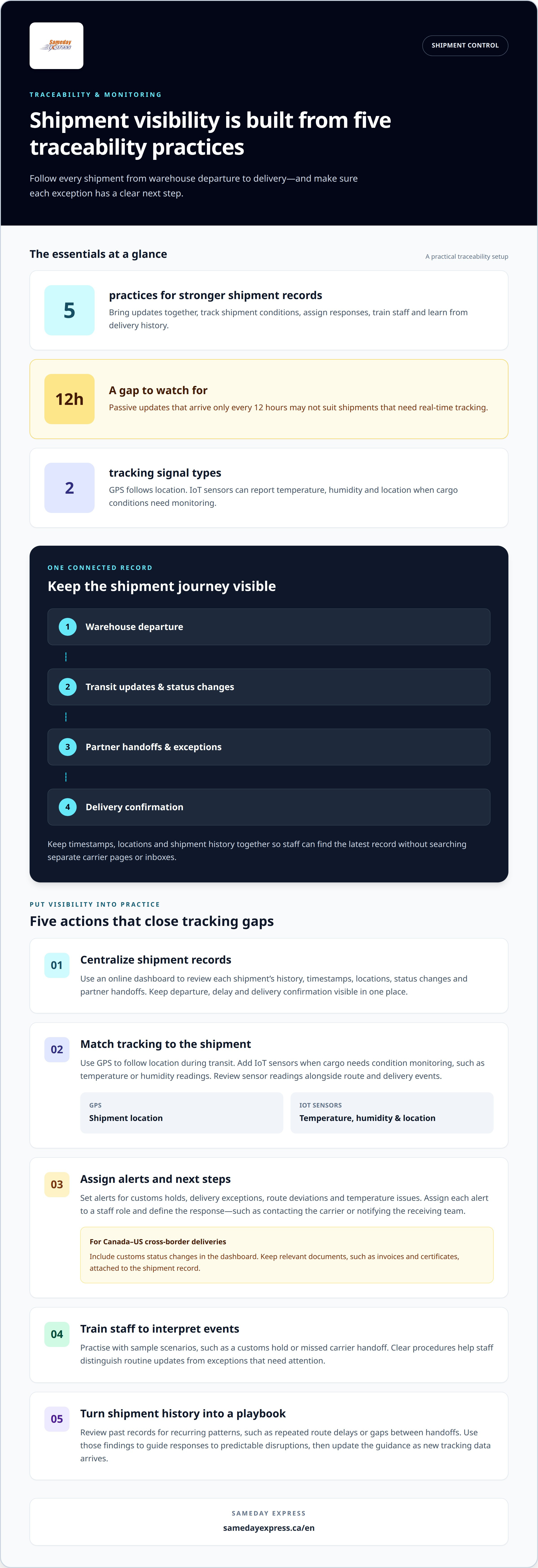
Build traceability around a clear record of every shipment, from warehouse departure to final delivery. Use live location and status updates to spot exceptions and decide who should act next.
-
Set Up Online Shipment Dashboards
Connect shipment records in an online dashboard and review each shipment’s history from dispatch through delivery. Check timestamps, locations, status changes and handoffs between shipping partners. For example, a record showing a missed collection followed by a late arrival can reveal where follow-up is needed. Avoid relying on passive updates that arrive only every 12 hours when you need real-time tracking.
Keep key events visible in one place, including departure, delays and delivery confirmation. A centralized system can track shipments from warehouse departure to their destination, helping staff find the latest record without searching separate carrier pages or inboxes.
-
Enable GPS and IoT Shipment Tracking
Use GPS tracking to follow a shipment during transit, and add IoT sensors when the cargo needs condition monitoring. Sensors can report temperature, humidity and location. For example, a temperature-sensitive shipment—such as research materials from Peptide Store—can trigger an alert when its recorded conditions change. Match the tracking method to the goods and packaging rather than assuming location data alone shows the shipment’s condition.
Review sensor readings alongside route and delivery events. A location update shows where a vehicle is, while a temperature reading can reveal a change in the shipment’s environment. Together, these details help staff respond to a deviation instead of relying on an estimated arrival time alone.
-
Set Alerts for Exceptions and Handoffs
Set alerts for customs holds, delivery exceptions, route deviations and temperature issues. Assign each alert to a staff role and define the next action, such as contacting the carrier or notifying the receiving team. Record every handoff between shipping partners, since an undocumented transfer can leave a gap in the shipment history.
For Canada-US cross-border deliveries, include customs status changes in the dashboard. Attach relevant shipment documents, such as invoices and certificates, to the tracking interface so staff can find them during a border crossing. Keep document access connected to the shipment record instead of scattering files across unrelated folders.
-
Train Staff to Read Tracking Events
Train operations staff to interpret customs statuses, port delays and delivery alerts. Use sample scenarios, such as a customs hold or missed carrier handoff, to practise identifying the next response. Clear procedures help staff distinguish routine updates from exceptions that need attention, without leaving an alert unassigned.
-
Turn Shipment History Into a Playbook
Review past shipment records for recurring patterns, such as repeated delays on a route or frequent gaps between handoffs. Use those findings to create a playbook for predictable disruptions. Update the guidance as new tracking data arrives, so teams can make decisions based on actual shipment history instead of repeating the same response.
Shipping software features and automation
Configure shipping software around the decisions your team makes each day. Getting control of our company’s shipping starts with accurate order data and repeatable processes. Automate routine tasks, but keep exceptions visible to staff.
- Map the order journey before changing software settings. Follow an order from checkout through picking, packaging, dispatch and delivery. Note where staff manually re-enter addresses, parcel details or service choices. For example, record each time someone copies an order number into a carrier portal. That handoff may be a practical opportunity for automation.
- Connect shipping software with your ERP so order, inventory and shipping information can pass between systems. Shipment updates can refresh inventory levels, invoices and delivery timelines automatically. Decide which system owns each data field, such as the delivery address or order status, to prevent one platform from retaining outdated information after a change.
- Create shipping rules for repeatable decisions. A centralized platform can apply custom rules based on area, postal code and weight. For example, a rule can route a parcel by destination and apply a different workflow when its weight changes. Keep each rule clear so staff understand why an order was handled that way.
- Configure automated fulfilment around confirmed order events. Set the system to prepare a shipping label after approval or add tracking details to the customer record after booking. Keep a manual review step for exceptions, such as an incomplete address or unusual parcel. Automation should handle predictable tasks without silently carrying errors forward.
- Test the configuration with real order data before launch. Check booking accuracy, service selection, transit-time displays and any CO2 impact calculations the platform provides. Include Canadian domestic and Canada-US cross-border shipment examples if both are part of your workflow. Confirm each order reaches the correct stage and staff can identify errors before launch.
- Measure whether automation improves visibility and reduces repeated data entry. Review failed bookings, duplicate records and orders that need manual correction. If a rule produces the wrong result, adjust its conditions and test it again with an affected order. Getting control of our company’s shipping also means recording system changes so staff can trace how each shipping decision was made.
Urgent orders may need direct coordination beyond routine software workflows. For shipments requiring a time-critical handoff, explore business delivery support.
Small-business logistics challenges
Small teams often manage supplier arrivals, outbound orders and returns through separate processes. Use these steps to connect logistics information and find practical ways to improve daily operations.
- Bring supplier, carrier and customer updates into a cloud-based logistics platform. A shared dashboard can show order status and expected arrival dates alongside shipment details. For example, staff can check whether a supplier order is still in transit before scheduling receiving work. Give each team access to the information it needs so warehouse and customer service staff work from consistent records.
Use the platform to review inbound volume, frequency and delivery timing. Compare records across suppliers to identify shipments that may be coordinated. If separate orders arrive around the same time, consolidated planning may reduce fragmented receiving tasks.
- Map the logistics hub around the way goods move through your operation. Mark each handoff, from supplier arrival to storage, order picking, packaging and dispatch. For example, a small e-commerce business can record where incoming stock is received and where outgoing parcels wait for collection.
Use the map to spot repeated handling or unclear ownership. Assign a responsible role to each stage, such as receiving, inventory updates or dispatch. Clear handoffs make it easier to trace a delay to the process that needs attention.
- Use inbound freight data to review purchasing and receiving patterns. Record shipment volume, frequency and actual arrival timing by supplier, then compare planned and actual arrival dates. If orders from two suppliers regularly reach the same hub close together, adjust receiving plans to manage both arrivals without disrupting outgoing work.
Mobile supply chain platforms can give staff access to order details and arrival dates while they work. Use that visibility to coordinate receiving and identify opportunities to combine supplier loads. Base decisions on actual shipment details, not assumptions about what is arriving.
- Build a clear returns process that links the customer request to the returned parcel and its next status. Record whether an item is awaiting pickup, in transit, received or ready for inspection. Customer service can then use the return status to provide a consistent update instead of searching separate messages.
Route returned goods to a defined receiving area, then record the inspection outcome and inventory decision. This separates reverse logistics from new-order fulfilment and helps prevent returned stock from being treated as ready to ship before review.
- Review the workflow when service issues recur. Use platform records to identify repeated late arrivals, unplanned handling or unclear return updates. Choose one process to improve, assign an owner and track whether the change reduces the same disruption in later shipments.
Operational barriers to shipping control
Shipping changes can affect inventory, staff workflows and customer commitments. Audit the current process first, then plan changes around operational risks.
-
Audit the Current Shipping Process
List each shipping step, from order release to delivery, and record who handles it. Review shipment records, packaging, failed deliveries and returns. Group the information by route, shipment type and shipping option. This audit shows where manual work or repeated delays affect daily operations and delivery commitments.
To audit your process, compare shipment records, then assess service performance and internal handling. Identify steps that could put inventory accuracy or on-time delivery at risk.
-
Assess Risks of Carrier Changes and Consolidation
Map the systems, staff and inventory workflows that depend on each carrier before changing providers or consolidating shipping operations. Switching providers can involve manual data transfers and service disruptions. For example, a new booking process may leave staff re-entering order details while older records remain in another system.
Changing carriers or consolidating operations can interrupt data flow and disrupt service. Plan a transition that protects shipment records and keeps responsibilities clear.
- Identify which orders rely on specialized shipping options or established handoffs. A consolidated process may simplify routine parcel movements, but one workflow may not suit every destination, delivery window or shipment type. When evaluating transit options, comparing dedicated haulage vs shared freight helps clarify when exclusive vehicle use is justified over consolidated groupage. Keep exceptions visible, assign a staff owner and document the steps for urgent, cross-border or otherwise distinct shipments.
- Test proposed changes on a limited workflow before applying them across the supply chain. For example, transfer a defined group of orders and compare booking records, inventory updates and delivery confirmations. This can reveal missing fields and unclear responsibilities while the existing process remains available as a reference for resolving errors.
- Set a transition plan with named owners for system access, shipment data and customer updates. Record which team handles open orders during the change and how staff will resolve a missing status or booking record. Review exceptions during the transition, and pause expansion if unresolved errors threaten inventory accuracy or delivery commitments.
- Use audit findings to decide what to change first. If manual entry causes recurring booking errors, address that workflow before consolidating carriers. If delays cluster around a specific handoff, clarify ownership at that stage. A staged plan can improve control without changing every shipping process at once.
How do I track shipments and delivery performance across carriers?
Use one consistent record for every carrier, then compare delivery events and performance measures. These steps turn separate shipment records into practical information for purchasing and operations.
- Assign every shipment a unique tracking ID that appears in carrier records and internal systems. Link it to the order, destination, dispatch date and carrier. Staff should be able to find a parcel using the same reference in the operations platform and the carrier’s tracking record. Consistent IDs make it easier to match delivery events with the right customer order.
- Record key delivery events using the same definitions across carriers. Capture dispatch, expected arrival, actual delivery and any recorded exception. Compare actual delivery times with estimates for the same route or service type to distinguish a one-off disruption from a recurring pattern. When shipment records connect to operations, teams can plan purchasing and inventory decisions around actual arrival times.
- Choose performance measures that support clear decisions. Track on-time delivery against the promised date, exception frequency and the time taken to resolve a reported problem. Review each measure by carrier, destination and shipment type. Overall results can hide weaker performance on a particular route, so keep route-level records before changing shipping assignments.
- Record shipment volume and frequency alongside the relevant purchase order. This makes it easier to review inbound transportation requirements by product, supplier or ordering pattern. Keep these details linked to each shipment so teams can plan purchasing and inventory using accurate operational records.
- Review the combined records regularly and assign each finding an operational owner. If one route shows recurring delays, check its delivery history before adjusting purchase timing. Use detailed shipment records to inform purchasing decisions. Keep the original carrier, route and shipment records available so teams can explain each change and assess the results later.
Need a clearer plan for urgent or routine shipments? Explore shipment support for your business.
Make delivery records part of the purchasing review. Use actual arrival information in the operations platform when considering replenishment, and treat estimates as planning inputs rather than the final record. If expected and actual arrival times differ, connect the observed timing to the relevant shipment and order so future purchasing decisions reflect what happened, not only what was forecast. This links tracking to operational choices. When reviewing a shipment, consider whether its actual timing calls for a change to the planned purchase or inventory action, then record that decision alongside the shipment information. Connecting tracking with operations helps teams use actual delivery experience in routine purchasing decisions.
Sameday Express
Sameday Express can support a specific order when your shipping plan calls for urgent delivery. For time-sensitive shipments, consider same-day delivery or Rush delivery. Direct Drive is another option when a shipment needs a direct route.
Match the service to the shipment’s urgency, destination and handling needs. This gives your operations team a practical way to manage time-sensitive deliveries without treating every order the same. Sameday Express can support the delivery side of your shipping process while you manage order records, tracking and performance across the wider supply chain.
Contact Sameday Express Inc. to discuss your company’s shipping needs.
Make your next shipping decision with confidence
Use the information your team has gathered to choose one shipping improvement to put into practice first. A clear priority, such as assigning ownership for shipment exceptions, gives staff a defined next step and makes progress easier to assess.
Sameday Express can discuss delivery support for your company’s shipping needs. Share the shipment type and required timing to identify a suitable next step.
Take the next step toward a shipping process that works for your business. Contact Sameday Express Inc. for shipping support to discuss your requirements and move forward with confidence.
Frequently Asked Questions
What are logistics companies and how can they solve small business shipping challenges?
Logistics companies coordinate the movement and delivery of goods, helping businesses manage shipping tasks that would otherwise take staff time. A small business might use a courier partner for urgent customer orders while its team focuses on inventory and fulfilment. Suitable support depends on the shipment’s destination, timing and handling needs. Keep responsibility for order information and customer updates clear, even when delivery is handled externally.
How can a company centralize control of shipping and carrier accounts?
Give one operations owner responsibility for carrier account access, shipping procedures and account records. Maintain a shared register showing each account’s purpose, authorized users, billing contact and connected systems. Set a standard booking process so staff know which account and approval path applies to each shipment. Review access when employees change roles, and document who can add users or update account settings.
What shipping software helps manage business shipments across carriers in Canada?
Look for a shipping platform that supports the carriers your business uses, connects with its order or inventory system, and produces reports your team can review. Before choosing, test it with representative Canadian destinations, parcel details and service options. Confirm that staff can manage account permissions and retrieve shipment records without relying on one person’s login. Avoid choosing based on a feature list alone.
How do I compare carrier service performance in Canada?
Compare shipments with similar destinations, dimensions, service levels and delivery requirements. Review delivery performance alongside shipment frequency and volume. Use documented shipping patterns to discuss contract terms, including whether a longer-term agreement could support reliable service. Include operational fit in the comparison: a carrier may not suit a route if delivery results disrupt customer commitments.
How can a company manage shipping rules, approvals, and employee access?
Write down which roles can book shipments, approve exceptions and change account settings. Set clear rules for common decisions, such as which service staff may select for standard parcels and which shipments need manager approval. For example, staff could submit an unusual destination or delivery request for review before booking. Keep an access record and update it when responsibilities change so permissions match each employee’s current role.
Disclaimer
Blog Disclaimer
The information published on the Sameday Express Blog is provided for general informational and educational purposes only. While we strive to keep all content accurate and up to date, Sameday Express makes no representations or warranties of any kind, express or implied, regarding the completeness, accuracy, reliability, suitability, or availability of the information contained in our articles.
The content on this blog does not constitute legal, customs, tax, regulatory, financial, or professional advice. Shipping regulations, carrier policies, customs requirements, and transportation laws may change without notice and may vary by destination. Readers should verify current requirements with the appropriate government authorities, carriers, or qualified professionals before making shipping or business decisions.
Sameday Express is not liable for any loss, damage, delays, or consequences arising from the use of, or reliance on, information published on this website. Any actions taken based on the information provided are at the reader's own risk.
References to third-party companies, products, services, or websites are provided for informational purposes only and do not constitute an endorsement or recommendation by Sameday Express.
All blog content, including text, graphics, images, and logos, is the property of Sameday Express unless otherwise stated and may not be reproduced or distributed without prior written permission.
For specific shipping requirements, pricing, transit times, or logistics solutions, please contact Sameday Express directly for personalized assistance.


